
What an agent sandbox is
Claude Code, Codex and OpenCode don't just write code. They install packages, run your tests, start servers and delete files. On your laptop they do it next to your photos, your SSH keys and your browser's logins.
An agent sandbox is a separate machine for that work. The agent can do what it needs there, and if it gets something wrong, the damage stays there.
Rented by the second, or your own
One way is to rent one. E2B, Daytona, Vercel Sandbox, Modal and Upstash Box hand you a sandbox when you ask for one and charge for the time it runs, several of them by the second. Some limit how long a session can run, from under an hour to a day, and most can pause a sandbox and keep its files for later.
The other way is a small server of your own. It's always there, your projects and tools stay put between sessions, and it costs the same each month however long the agents work. With Hewy on it:
- Agents are fenced in. Hewy runs each one inside bubblewrap. It can work on your files and use the network, but it can't touch the Hewy Daemon, change your shell's startup files or SSH settings, or use sudo.
- They keep working when your laptop is closed. The agents run on the server, not on your laptop.
- You drive them from a native app on your Mac, iPhone or Android phone, with the server's files and a terminal right beside the chat.
What you need
- An account with one of the hosts below.
- Hewy on your Mac, iPhone or Android phone. It's free for 14 days.
- A Claude or ChatGPT plan for the agents, or an API key.
Pick a host
All three run Ubuntu 24.04, and Hewy works the same way on each. Pick on price, on where the servers are, and on what you already use.
| Host | 2 vCPU, 4 GB | Per month, about | Logs in as | Good to know |
|---|---|---|---|---|
| Hetzner Cloud | CPX22 | €20 | root | Germany and Finland. The CX23, about €6, is cheaper when it’s in stock. |
| DigitalOcean | Basic, 4 GB | US$24 | root | Billed by the second. |
| AWS Lightsail | 4 GB, dual-stack | US$24 | ubuntu | Comes with a normal user. Handy if you’re on AWS already. |
Prices are before tax, as of November 2026. Claude Code asks for at least 4 GB of memory, so that's the floor. If you'll run several agents at once or build big projects, go to 8 GB: about US$44 on Lightsail, US$48 on DigitalOcean or €36 for Hetzner's CPX32.
Before you start
Copy Hewy's key. Each host lets you add an SSH key as you create the server. Give it Hewy's, and you never need a password. In Hewy, open SSH Keys (on iPhone, This Device › SSH Keys), choose this device's key and copy its public key. It's one line that starts with ecdsa-sha2-nistp256. If a host's SSH key field won't take it, choose a root password there instead: the user below still gets Hewy's key.
Plan for a normal user. Hetzner and DigitalOcean log you in as root. Hewy works as root, but then the agents run as root too, and could change anything on the server. So on those two, have the host make a normal user as well. Paste this where the steps say, with your key on the last line:
#cloud-config
users:
  - name: dev
    groups: sudo
    shell: /bin/bash
    sudo: "ALL=(ALL) NOPASSWD:ALL"
    ssh_authorized_keys:
      - ecdsa-sha2-nistp256 AAAA…   # Hewy's key
That's a user called dev who logs in with Hewy's key and can use sudo without a password. Inside Hewy's sandbox the agents can't use sudo at all, so no password just means Set Up won't need to ask you for one.
Hetzner Cloud
- In the Hetzner Console, open your project, go to Servers and click Add server.
- Type: CPX22, or CX23 if it's in stock. Location: the one nearest you. Image: Ubuntu 24.04.
- SSH key: add Hewy's key and select it.
- Cloud config: paste the cloud-config from above, with your key on its last line.
- Give it a Name, click Create & Buy now, and copy its IPv4 address.
Hetzner adds no firewall unless you choose one under Firewalls, so SSH (port 22) is open. In Hewy, you'll log in as dev.
DigitalOcean
- In the control panel, start a new Droplet.
- Choose Region: the one nearest you. Choose an image: Ubuntu 24.04 LTS. Choose a Droplet Plan: Basic, 4 GB and 2 vCPUs.
- Choose Authentication Method: SSH key. Click Add SSH Key, paste Hewy's key, and select it.
- Under Additional Options, choose Startup scripts and paste the cloud-config from above, with your key on its last line.
- Under Finalize Details, set a Hostname, click Create Droplet, and copy its IPv4 address.
DigitalOcean attaches no Cloud Firewall unless you add one, so SSH (port 22) is open. In Hewy, you'll log in as dev.
AWS Lightsail
Lightsail already logs you in as ubuntu, a normal user who can use sudo without a password, so there's no cloud-config. Its key import expects RSA keys, so Hewy's key goes in with a launch script instead.
- In the Lightsail console, choose Create instance.
- Pick a location, the Linux platform, then OS Only and Ubuntu 24.04 LTS.
- Choose Add launch script and paste this, with your key between the quotes:
#!/bin/bash mkdir -p /home/ubuntu/.ssh echo 'ecdsa-sha2-nistp256 AAAA…' >> /home/ubuntu/.ssh/authorized_keys chown -R ubuntu:ubuntu /home/ubuntu/.ssh - Choose a dual-stack plan with 4 GB.
- Give it a name, choose Create instance, and copy its public IP address.
Lightsail's firewall lets in SSH (port 22) and web traffic (port 80) from anywhere. In Hewy, you'll log in as ubuntu.
Then, in Hewy
-
Add the server
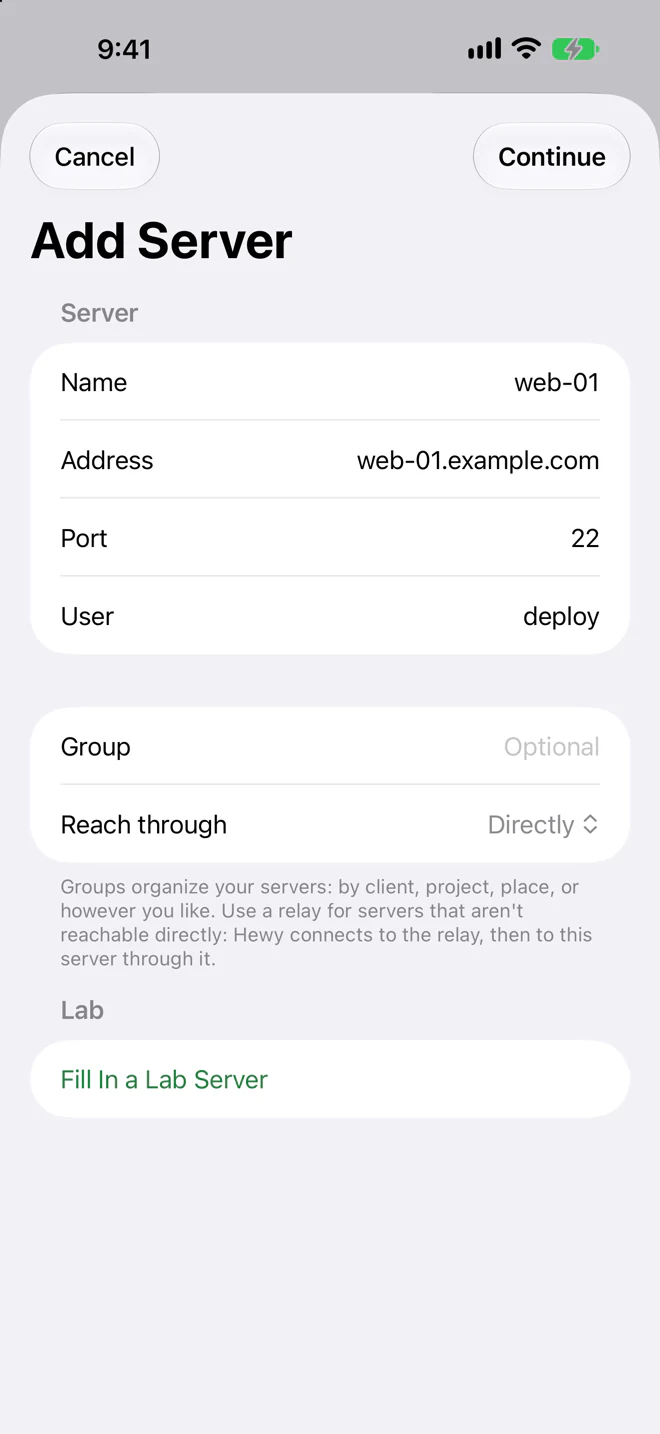
Tap Add Server. Enter the server's IP address as the Address, and
devas the User (ubuntuon Lightsail), then tap Continue.Hewy shows the server's fingerprint. To be sure it's yours, run the command Hewy shows in your host's web console and compare, then tap It Matches. Your key is already on the server, so tap Log In: no password needed. Choose SSH, files and AI agents, then Continue to Set Up.
-
Set it up, with sandboxes
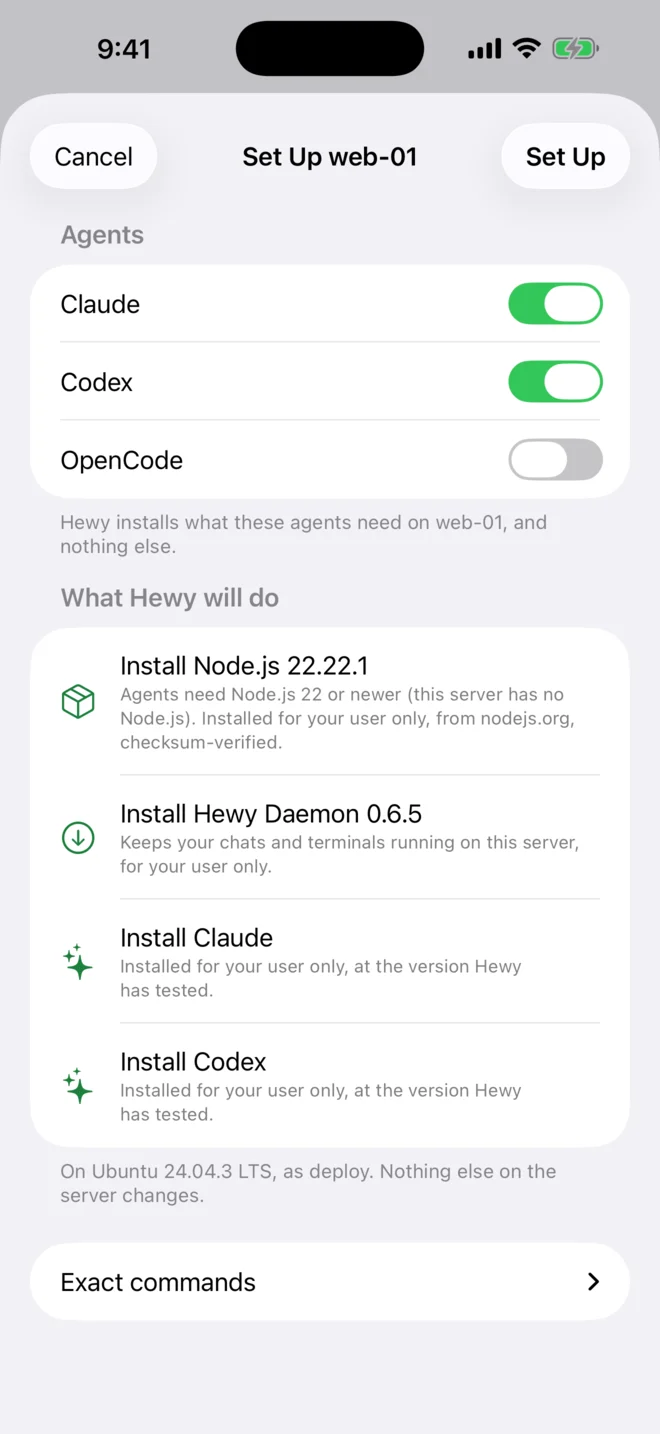
Choose your agents: Claude, Codex, OpenCode, or all three. Under What Hewy will do, Hewy lists everything it will install before it starts. The basics go in your own account, with no root needed.
A few steps are marked Admin, such as Allow sandboxes on this server, which lets Hewy fence the agents in. Your user can use sudo without a password, so Set Up does those too, without asking. Tap Set Up, then sign in with your Claude or ChatGPT plan, or add an API key.
On a server where your user can't use sudo, Set Up does everything else and gives you the Admin commands to pass on, with Copy Commands.
Hewy installs each agent at a version it has tested, and keeps them current after that. When Claude Code or Codex needs an update before it will run, the chat says so, with one button to update it.
-
Start your first chat
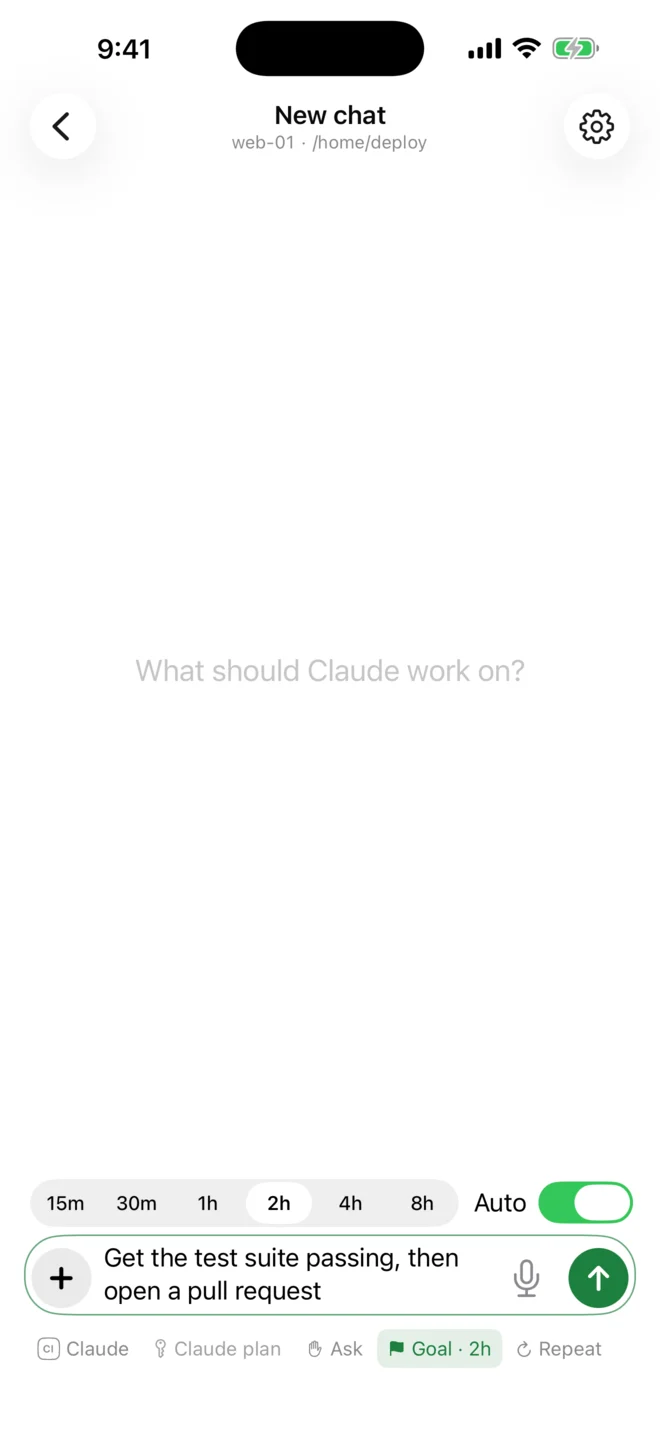
Clone a project from Hewy's terminal, start a chat in its folder, and say what you want done. Turn on Goal for a longer job. Then close the laptop. The agent keeps working, and your phone lets you know when it needs you. There's more on that in Keep Claude Code running after you close your laptop.


Hewy is free for 14 days. The setup guide shows everything Set Up does on your server, step by step.