HewyJoin the waitlist

For Mac, iPhone and Android

Your AI agents, on your own servers.

Claude, Codex and OpenCode work right on your servers, with your Claude or ChatGPT plan or your own keys. They keep going when your laptop closes, ask your phone before they act, and when one won't do the work, another picks up the chat. And around them, a full SSH client: terminals, files, a VPN and your keys.

Coming soon forMaciPhoneAndroid

One email when Hewy launches, then we delete the list.

See what it does →

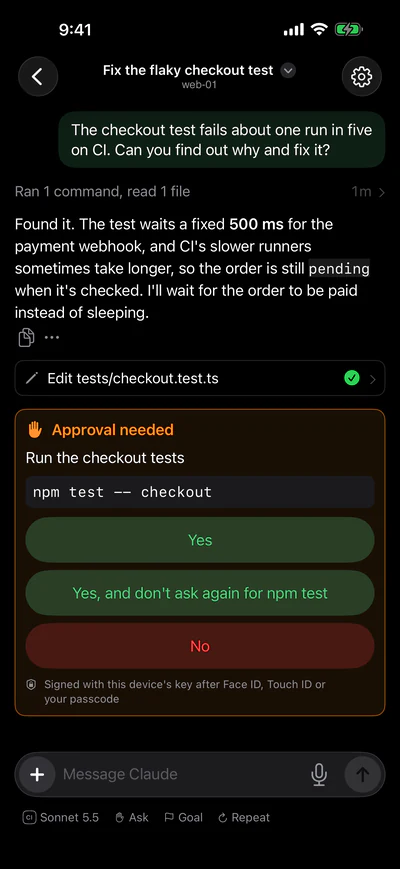
Hewy's Servers grid: twelve servers in two groups, Home and Work, each with an icon in a color of its own: a home hub, a Mac mini, a NAS, a Raspberry Pi, a router and a Mac Studio, then API, CI, database, staging, web and worker servers. All are live but the hub, which is resting. An agent on web-01 asking on an iPhone to run the checkout tests: Yes; Yes, and don't ask again for npm test; or No.

No computer left running

Most coding agents need a laptop left open, or run in someone else's cloud. Hewy runs them on the servers you already have, right next to your code.

Never stuck with one AI

Every provider has its own rules, and sometimes they block real work. Switch the chat to another agent, and the conversation goes with it.

You stay in charge

Agents ask before they act, and your iPhone gets the question. Turn AI off for any server that shouldn't have it.

AI agents

Claude, Codex and OpenCode, working on your servers.

Start a chat on any server you can SSH into. The agent runs there, next to your code, and keeps going when your laptop closes or your phone sleeps. Talk to it, or just say what you want with the microphone.

  • Use your Claude or ChatGPT plan, or your own API keys.
  • Pick the model and effort for each chat, and switch any time.
  • Give it a goal, and it works until it's done.
  • Repeat a prompt every night, or fork a chat to try another way.
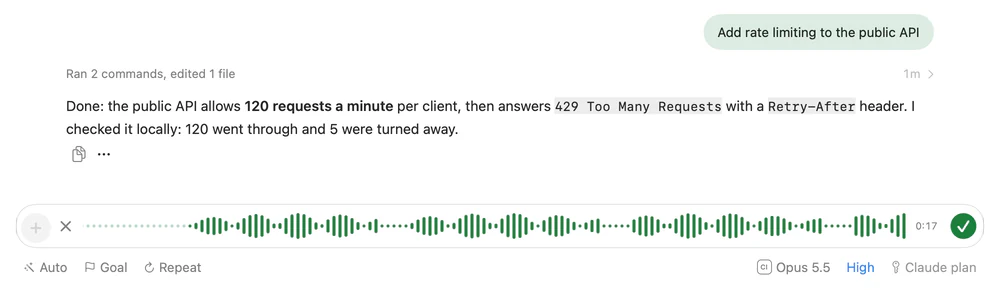
A chat with Claude on api-01: it added rate limiting to the public API and checked it. The message box is taking dictation, its waveform moving, and below it the chat runs Opus 5.5 at high effort on a Claude plan. The model menu: Claude with Opus 5.5 chosen, Sonnet 5.5 and Haiku 5.5; Codex with GPT-5.5, GPT-5.5 Codex and GPT-5.4 mini; and OpenCode with models from Anthropic, OpenAI and Google.

Any agent

When one agent won't do the work, another will.

Every AI provider has its own rules, and they change. A security review of your own product, a penetration test, an ordinary fix that trips a filter: it worked yesterday, and today the agent stops. Switch the chat to Claude, Codex or OpenCode, and the conversation so far goes with it, so the next agent picks up where the last one stopped.

  • Switch agents in the middle of a chat.
  • OpenCode reaches models from Anthropic, OpenAI, Google and others.
  • No one provider's rules decide what gets done.
  • Your code stays on your servers, whichever agent you use.
  • One app, one usage view, for every provider.

Connections

Agents that work together, with you in charge.

Connect a chat on one server to a chat on another, and their agents can message each other: your Mac's app agent asks your web server's agent for an API change, and hears back when it's live. No chat can reach another until you connect them.

  • You choose who can message whom, and which way.
  • Messages only, or images and files too.
  • For an hour, a day, or until you remove it.
  • Carried by your own devices, never our servers.
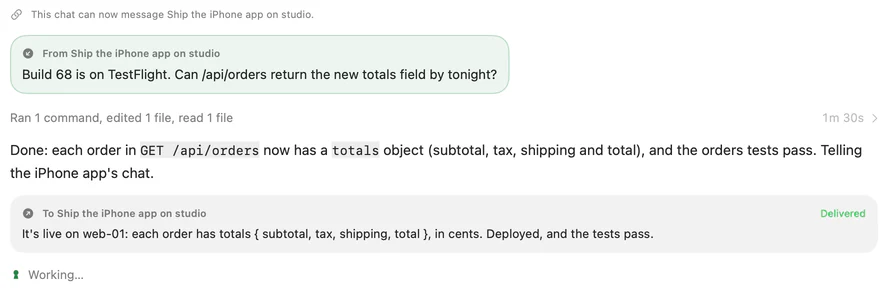
A chat on web-01 gets a message from Ship the iPhone app on studio: Build 68 is on TestFlight. Can /api/orders return the new totals field by tonight? The agent adds the field, the tests pass, and it sends word back, delivered. The connection between Ship the iPhone app on studio and Speed up the orders query on web-01: both ways, messages and images, until tomorrow, with the three messages it carried, each delivered.

Approvals

Approve from your pocket.

When an agent wants to run a command or change a file, your iPhone asks. Your answer is signed with your device's key, after Face ID, Touch ID or your passcode.

  • Ask, Auto or Full, for each chat.
  • Needs you lists every chat waiting on an answer.
  • Pick up any chat on your Mac where you left off.
Hewy on an iPhone: Needs you at the top, then servers grouped into Home and Work, with their chats. An approval on the iPhone: run the checkout tests, with npm test -- checkout.

Terminal

Terminals that keep running.

On servers set up with Hewy, the shell keeps running after you close the app. Leave a long command going, and pick the same terminal up on your Mac or your iPhone.

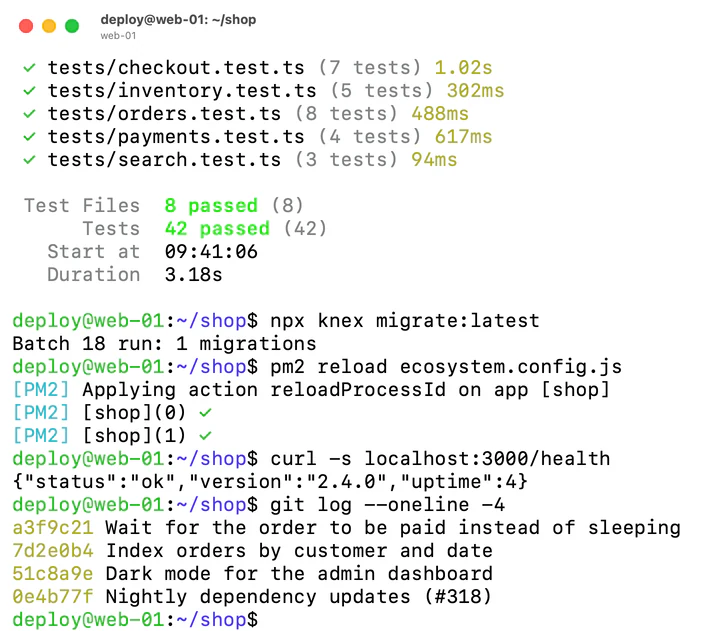
A terminal on web-01: the tests passing, all 42 of them, then a migration, a reload, a health check and the latest commits.

Files

Every server's files, in your pocket.

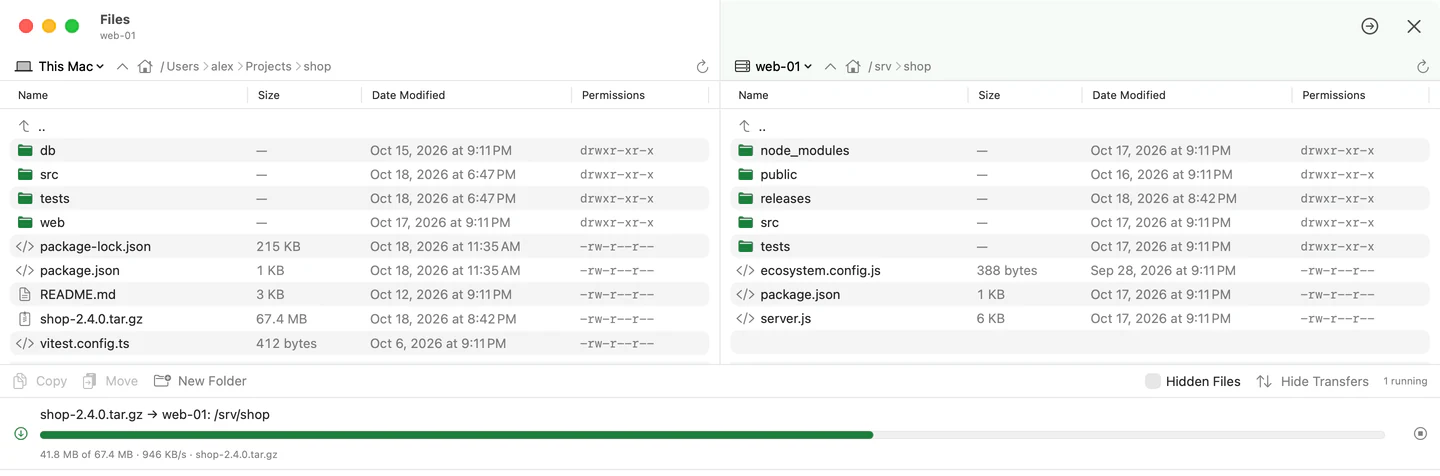
Browse, preview, upload and download on any server, from your iPhone or your Mac. On a Mac, open a server beside your Mac or beside another server, and drag between them. Copies between servers pass through your device, so your servers never need access to each other.

Files side by side: a project on this Mac and /srv/shop on web-01, with a release uploading from one to the other.

SSH keys

Every key accounted for.

See which keys reach which machines. Create and name keys, copy them between your devices end-to-end encrypted, and add or remove them without locking yourself out.

  • Your devices' own keys live in their Secure Enclave.
  • Access shows which keys each server lets in.
SSH Keys: this Mac's Secure Enclave key, a deploy key, an iPhone's key and an old laptop's, with the devices and servers each is on.

VPN

Send your Mac or iPhone through any server, in one tap.

Turn on a server's VPN and your device goes online from there, as if you were on its network: open your home NAS from a café, or use your office's connection from anywhere. There's nothing to install on the server. It uses the SSH you already have.

  • All your traffic, or just the server's own network.
  • Names on that network, like nas.lan, work too.
  • Your iPhone's port forwards keep working in the background.
  • Your traffic goes only to your own server. Hewy collects none of it.
hub's VPN on All: connected, 1.35 GB through 23 connections.

Port forwarding

Your servers' ports, on your Mac and iPhone.

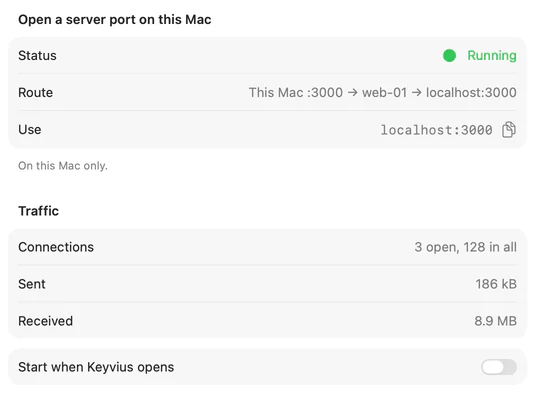
Open a server's dev site, database or dashboard at localhost on your Mac, or browse through a server as a SOCKS proxy. Set a forward up once, and switch it on whenever you need it. On iPhone it opens at a name like web-01.hewy, and keeps working while you use it in Safari.

  • Turn each one on and off from the sidebar.
  • Start the ones you always use when Hewy opens.
  • See each one's connections and traffic.
A port forward named Dev site, running: This Mac :3000 → web-01 → localhost:3000, with its traffic.

Your rules

Each server, your way.

Turn AI on only where you want it. On Linux, agents run in a sandbox, and you can hide the server's SSH keys from them, so they can't use its keys to reach your other machines.

web-01's settings: Hewy Daemon 0.5.16, AI agents on and running in a sandbox, and SSH keys hidden from agents.

Usage

Know what every chat costs.

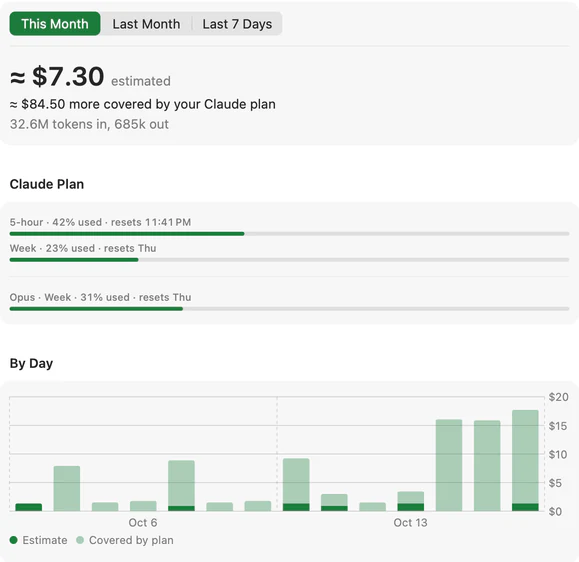
See what your agents used by day, server and chat, at your provider's prices, and how much of your Claude or ChatGPT plan's limits is left.

  • Exact token counts, from the agents themselves.
  • Your plan's 5-hour and weekly limits as they fill.
  • Estimates are always marked as estimates.
Usage this month: about $7.30 at API prices, and about $84.50 more covered by a Claude plan. The plan's 5-hour limit is 42% used, the week's 23% and Opus's week 31%, over a chart of each day's use.

Make it yours

A color for every server.

Give each server one of sixteen colors, or any color at all, and an icon for what it is. Group and tag them, and find the one you want at a glance, on your Mac and your iPhone.

Choosing a color for studio: Automatic, sixteen colors in two rows, with indigo chosen, and Any Color.

And everything around it.

Your models, your keys

Use your own API keys for Anthropic, OpenAI and others, or your Claude or ChatGPT plan, and pick one per chat. Hewy never marks up tokens.

Anything with SSH

Linux servers and Macs run agents, and one tap installs what they need. Routers, NAS boxes and the rest get terminals, files and key management.

Synced, end to end

Your servers, saved passwords, API keys and snippets follow you between your devices, encrypted on the device first.

A small home server on a shelf, its green light on, while someone reads in an armchair nearby.
Your server keeps working. You don't have to.

From a fresh server to an agent at work, in three steps.

  1. Connect to a server.

    Anything you can SSH into: a cloud VM, a Mac mini, a Raspberry Pi in the closet.

  2. Set it up.

    One tap installs what the agents need, and asks for your sudo password only when it must.

  3. Start a chat.

    Then close the app. Your agent keeps going, and tells you when it needs you.

Private by design.

Your devices connect straight to your servers, never through ours. Everything that syncs between your devices is encrypted on the device first, so we can't read it. Your devices' SSH keys live in their security chip (the Secure Enclave or Android's Keystore) and can't be copied out, and every release of the Hewy Daemon is signed with a key that never touches our build machine.

How Hewy protects you →

Questions

Do I need to keep my computer on?

No. Agents run on your server, which is on anyway. Your devices only connect to check in, approve and pick up where you left off.

Which servers work?

Anything you can SSH into. Agents run on Linux servers and Macs. Routers, NAS boxes and other devices that speak SSH get terminals, files and key management.

Which AI can I use?

Claude, Codex and OpenCode, with your own API keys or your Claude or ChatGPT plan. You choose per chat, and can switch a chat to another agent or model at any time.

Why not just use Claude's or ChatGPT's own apps?

Keep using them; Hewy works with the same plans. What it adds: the agents run on your own servers, next to your code, rather than in someone else's cloud; one chat can move between Claude, Codex and OpenCode when one won't do the work; approvals reach your iPhone, signed with its key; agents on different servers can work together; and one view shows what every provider has used. Plus a full SSH client for everything else.

What if an agent refuses to do something?

Switch the chat to another agent. Each provider has its own rules about what its models will do, and they don't always agree, so work one turns down another will often take on. The conversation so far goes with the switch (the most recent part, up to about 24,000 characters, with the tools that were used), so you don't start over.

What does the VPN carry?

Web browsing, apps, file shares, admin pages and SSH: anything over TCP, plus name lookups, through the server you choose. Video calls and games that need UDP don't go through it, and IPv6 sites fall back to IPv4. The server needs nothing installed, only SSH that allows forwarding, which is on by default.

Can Hewy see my code or my conversations?

No. Your devices talk straight to your servers. What syncs between your devices (your server list, saved passwords and API keys) is end-to-end encrypted, so our servers can't read it. What an agent reads goes to the AI provider you chose, as with any coding agent.

How much does it cost?

US$99 a year, or US$9.99 a month, after a 14-day free trial, for every feature on all your devices. AI usage is billed by your AI provider; Hewy never marks up tokens. Pricing →

Does it run on Android? And Windows?

Android, yes: Hewy is coming to Mac, iPhone and Android, each as an app of its own, and your Hewy account keeps your servers, keys and settings in step between them, end-to-end encrypted. Windows as a server, yes too: Hewy sets up and controls agents on Windows 10 and 11 PCs, alongside Linux and Mac servers. There's no Hewy app for Windows itself for now.

Your agents, on your servers, never clocking out.

For Mac, iPhone and Android. Free for 14 days, then US$99 a year or US$9.99 a month.

One email when Hewy launches, then we delete the list.